mirror of
https://github.com/crawlab-team/crawlab.git
synced 2026-01-21 17:21:09 +01:00

275 lines
12 KiB
Go
275 lines
12 KiB
Go
# Crawlab
|
||
|
||
<p>
|
||
<a href="https://github.com/crawlab-team/crawlab/actions/workflows/docker-crawlab.yml" target="_blank">
|
||
<img src="https://github.com/crawlab-team/crawlab/workflows/Docker%20Image%20CI:%20crawlab/badge.svg">
|
||
</a>
|
||
<a href="https://hub.docker.com/r/tikazyq/crawlab" target="_blank">
|
||
<img src="https://img.shields.io/docker/pulls/tikazyq/crawlab?label=pulls&logo=docker">
|
||
</a>
|
||
<a href="https://github.com/crawlab-team/crawlab/releases" target="_blank">
|
||
<img src="https://img.shields.io/github/release/crawlab-team/crawlab.svg?logo=github">
|
||
</a>
|
||
<a href="https://github.com/crawlab-team/crawlab/commits/main" target="_blank">
|
||
<img src="https://img.shields.io/github/last-commit/crawlab-team/crawlab.svg">
|
||
</a>
|
||
<a href="https://github.com/crawlab-team/crawlab/issues?q=is%3Aissue+is%3Aopen+label%3Abug" target="_blank">
|
||
<img src="https://img.shields.io/github/issues/crawlab-team/crawlab/bug.svg?label=bugs&color=red">
|
||
</a>
|
||
<a href="https://github.com/crawlab-team/crawlab/issues?q=is%3Aissue+is%3Aopen+label%3Aenhancement" target="_blank">
|
||
<img src="https://img.shields.io/github/issues/crawlab-team/crawlab/enhancement.svg?label=enhancements&color=cyan">
|
||
</a>
|
||
<a href="https://github.com/crawlab-team/crawlab/blob/main/LICENSE" target="_blank">
|
||
<img src="https://img.shields.io/github/license/crawlab-team/crawlab.svg">
|
||
</a>
|
||
</p>
|
||
|
||
中文 | [English](https://github.com/crawlab-team/crawlab)
|
||
|
||
[安装](#安装) | [运行](#运行) | [截图](#截图) | [架构](#架构) | [集成](#与其他框架的集成) | [比较](#与其他框架比较) | [相关文章](#相关文章) | [社区&赞助](#社区--赞助) | [更新日志](https://github.com/crawlab-team/crawlab/blob/main/CHANGELOG-zh.md) | [免责声明](https://github.com/crawlab-team/crawlab/blob/main/DISCLAIMER-zh.md)
|
||
|
||
基于Golang的分布式爬虫管理平台,支持Python、NodeJS、Go、Java、PHP等多种编程语言以及多种爬虫框架。
|
||
|
||
[查看演示 Demo](https://demo.crawlab.cn) | [文档](https://docs.crawlab.cn/zh/)
|
||
|
||
## 安装
|
||
|
||
您可以参考这个[安装指南](https://docs.crawlab.cn/zh/guide/installation)。
|
||
|
||
## 快速开始
|
||
|
||
请打开命令行并执行下列命令。请保证您已经提前安装了 `docker-compose`。
|
||
|
||
```bash
|
||
git clone https://github.com/crawlab-team/examples
|
||
cd examples/docker/basic
|
||
docker-compose up -d
|
||
```
|
||
|
||
接下来,您可以看看 `docker-compose.yml` (包含详细配置参数),以及参考 [文档](http://docs.crawlab.cn) 来查看更多信息。
|
||
|
||
## 运行
|
||
|
||
### Docker
|
||
|
||
请用`docker-compose`来一键启动,甚至不用配置 MongoDB 数据库,**当然我们推荐这样做**。在当前目录中创建`docker-compose.yml`文件,输入以下内容。
|
||
|
||
```yaml
|
||
version: '3.3'
|
||
services:
|
||
master:
|
||
image: crawlabteam/crawlab:latest
|
||
container_name: crawlab_example_master
|
||
environment:
|
||
CRAWLAB_NODE_MASTER: "Y"
|
||
CRAWLAB_MONGO_HOST: "mongo"
|
||
volumes:
|
||
- "./.crawlab/master:/root/.crawlab"
|
||
ports:
|
||
- "8080:8080"
|
||
depends_on:
|
||
- mongo
|
||
|
||
worker01:
|
||
image: crawlabteam/crawlab:latest
|
||
container_name: crawlab_example_worker01
|
||
environment:
|
||
CRAWLAB_NODE_MASTER: "N"
|
||
CRAWLAB_GRPC_ADDRESS: "master"
|
||
CRAWLAB_FS_FILER_URL: "http://master:8080/api/filer"
|
||
volumes:
|
||
- "./.crawlab/worker01:/root/.crawlab"
|
||
depends_on:
|
||
- master
|
||
|
||
worker02:
|
||
image: crawlabteam/crawlab:latest
|
||
container_name: crawlab_example_worker02
|
||
environment:
|
||
CRAWLAB_NODE_MASTER: "N"
|
||
CRAWLAB_GRPC_ADDRESS: "master"
|
||
CRAWLAB_FS_FILER_URL: "http://master:8080/api/filer"
|
||
volumes:
|
||
- "./.crawlab/worker02:/root/.crawlab"
|
||
depends_on:
|
||
- master
|
||
|
||
mongo:
|
||
image: mongo:4.2
|
||
container_name: crawlab_example_mongo
|
||
restart: always
|
||
```
|
||
|
||
然后执行以下命令,Crawlab主节点、工作节点+MongoDB 就启动了。打开`http://localhost:8080`就能看到界面。
|
||
|
||
```bash
|
||
docker-compose up -d
|
||
```
|
||
|
||
Docker部署的详情,请见[相关文档](https://docs.crawlab.cn/zh/guide/installation/docker.html)。
|
||
|
||
## 截图
|
||
|
||
#### 登陆页
|
||
|
||

|
||
|
||
#### 主页
|
||
|
||
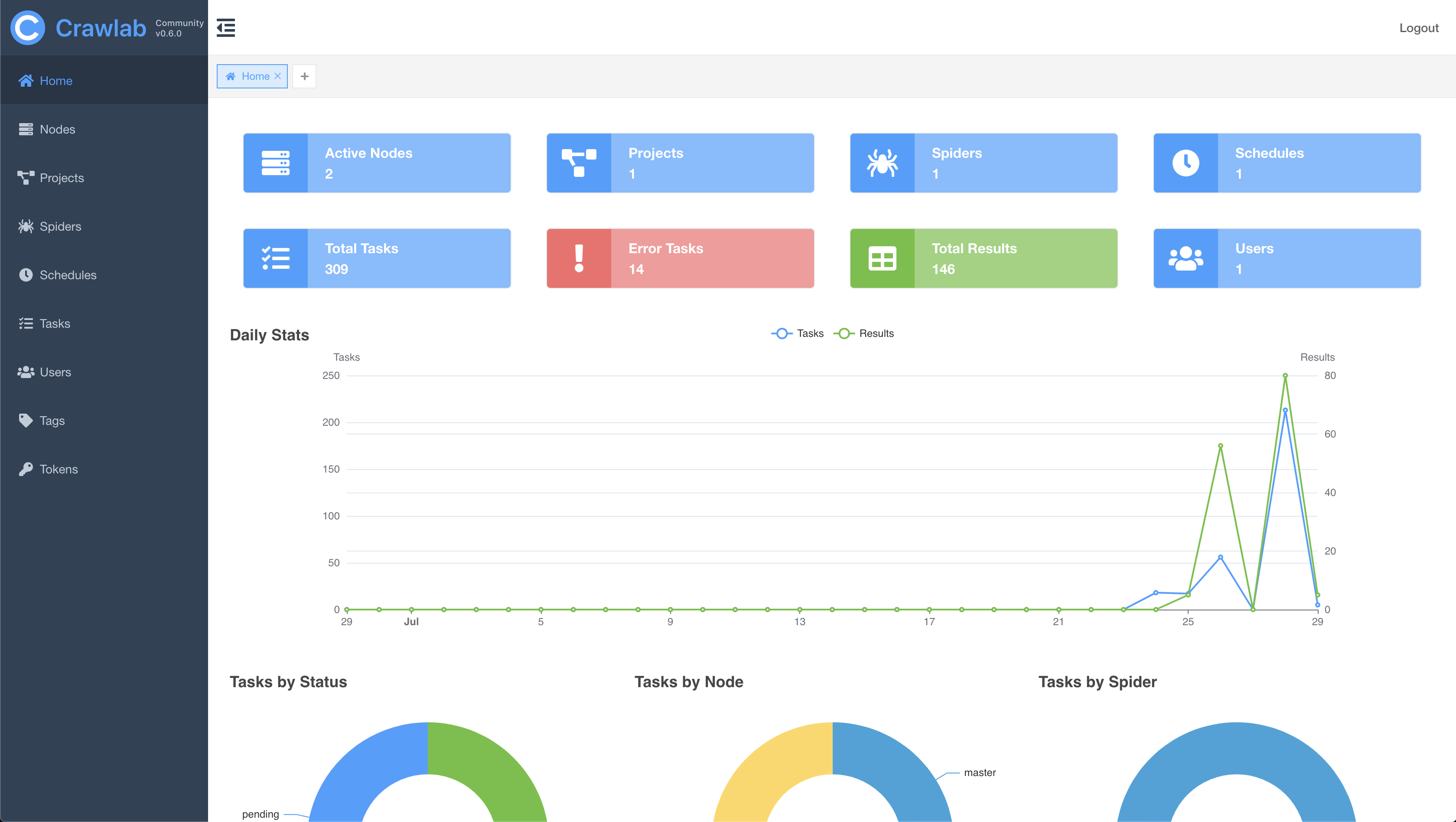
|
||
|
||
#### 节点列表
|
||
|
||
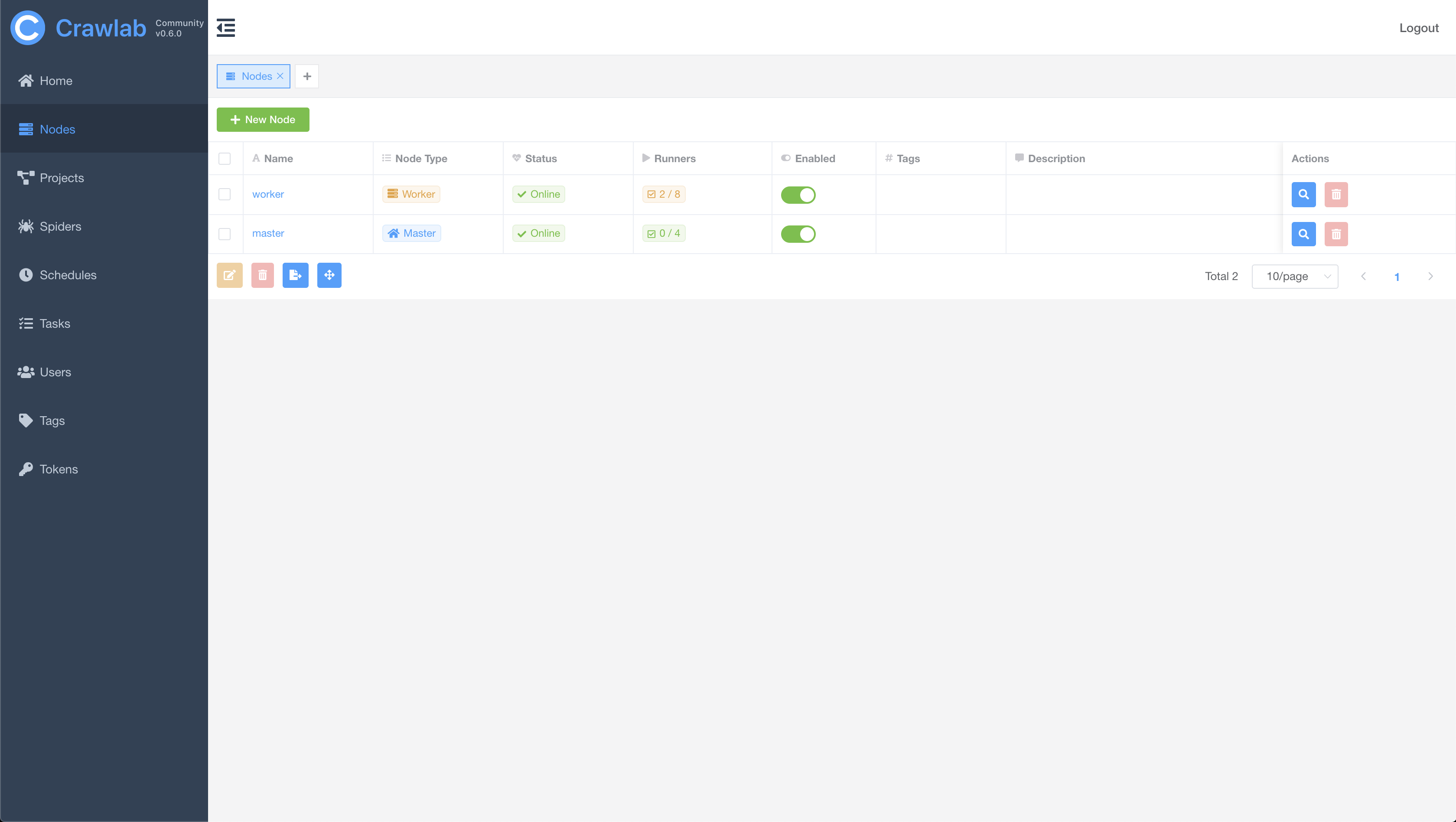
|
||
|
||
#### 爬虫列表
|
||
|
||

|
||
|
||
#### 爬虫概览
|
||
|
||

|
||
|
||
#### 爬虫文件
|
||
|
||
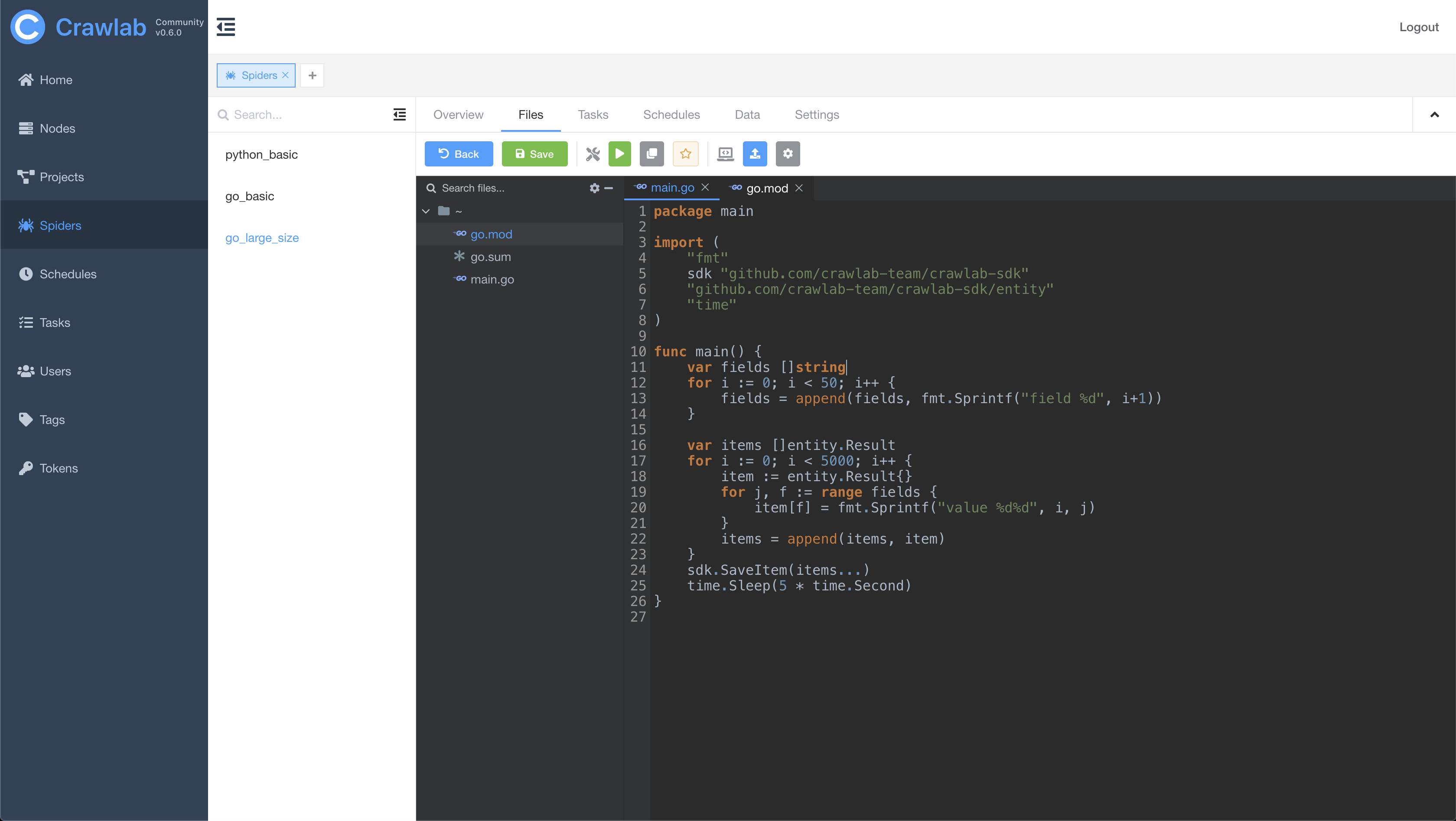
|
||
|
||
#### 任务日志
|
||
|
||
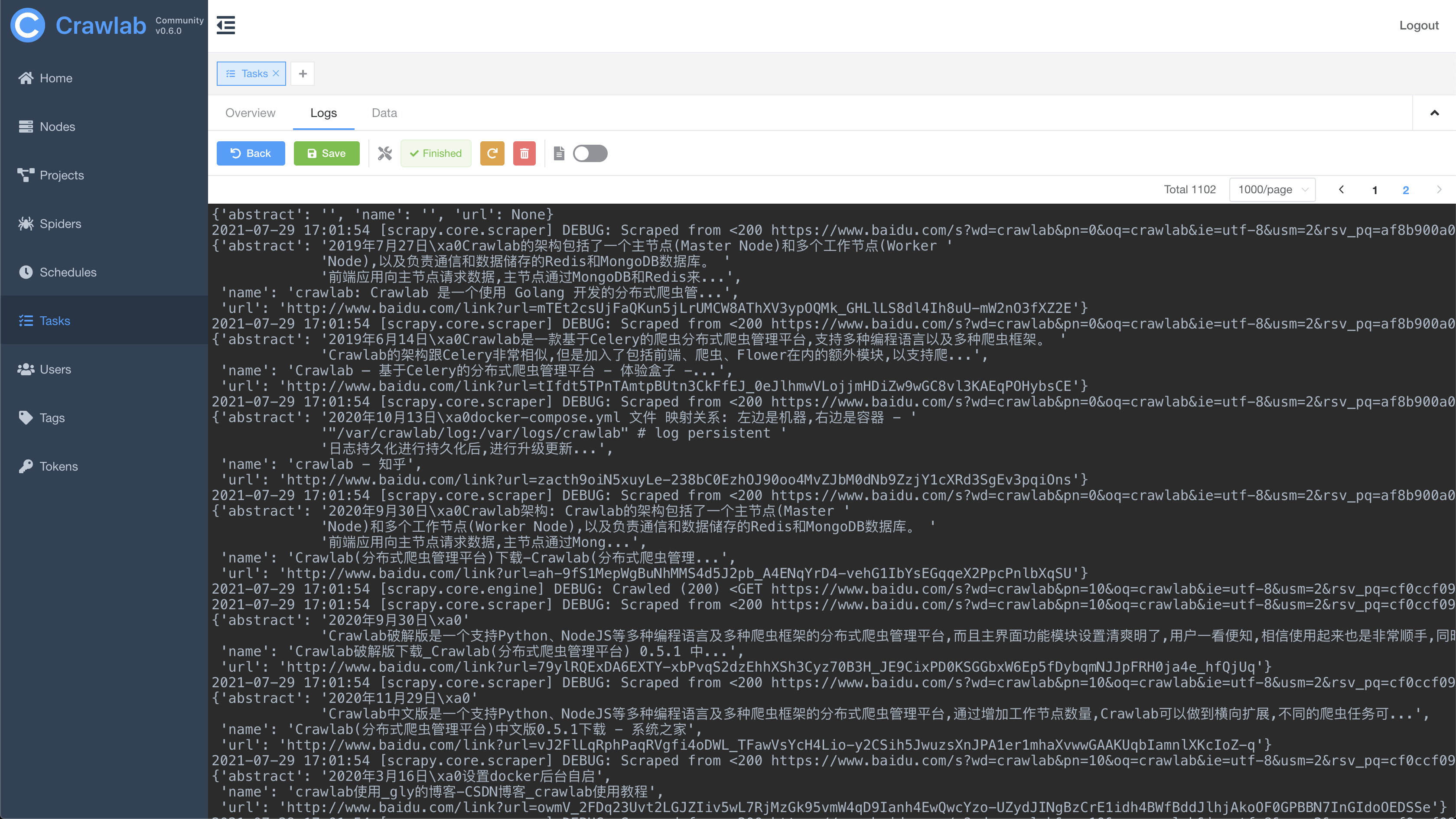
|
||
|
||
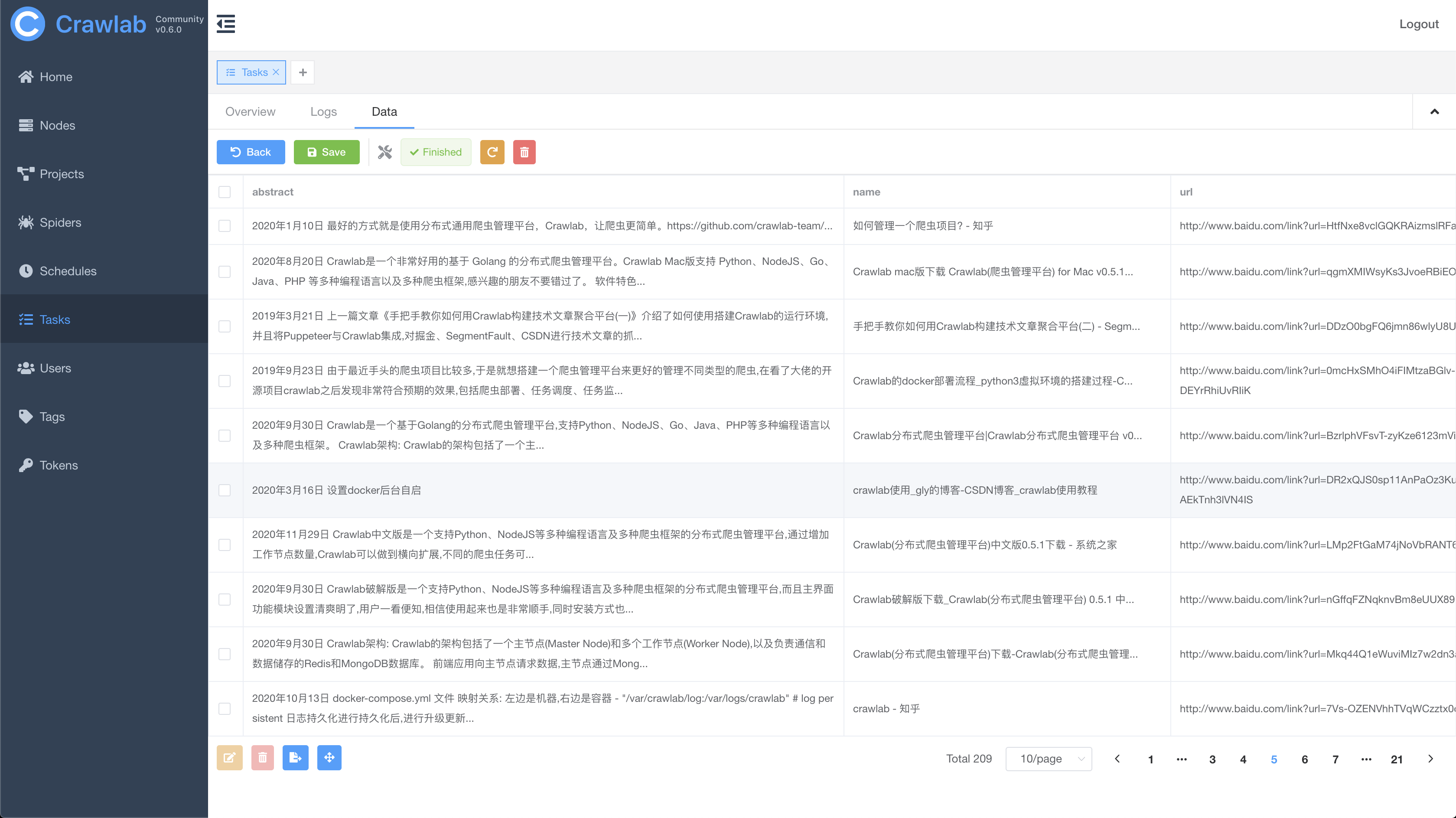
#### 任务结果
|
||
|
||
|
||
|
||
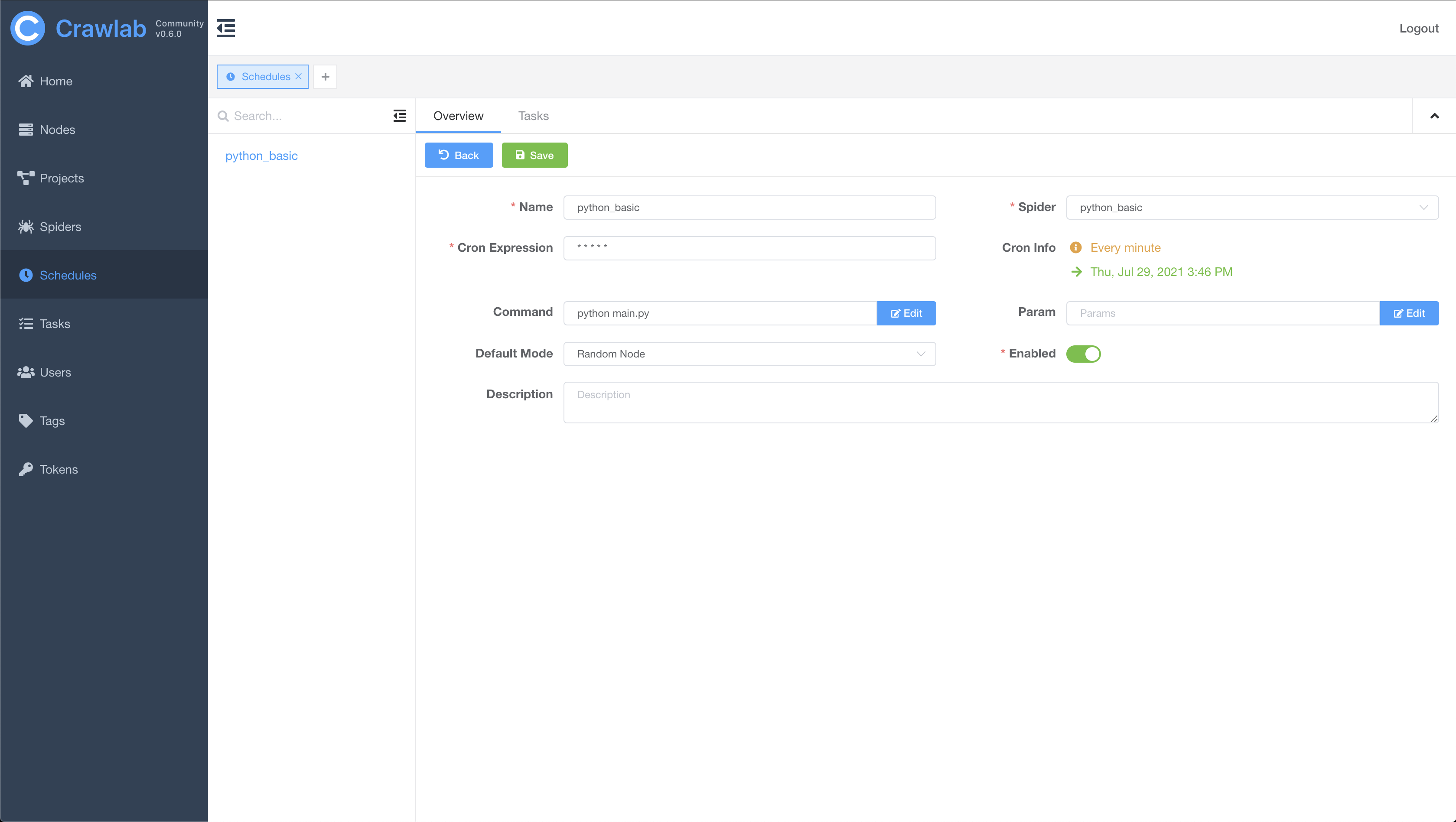
#### 定时任务
|
||
|
||
|
||
|
||
## 架构
|
||
|
||
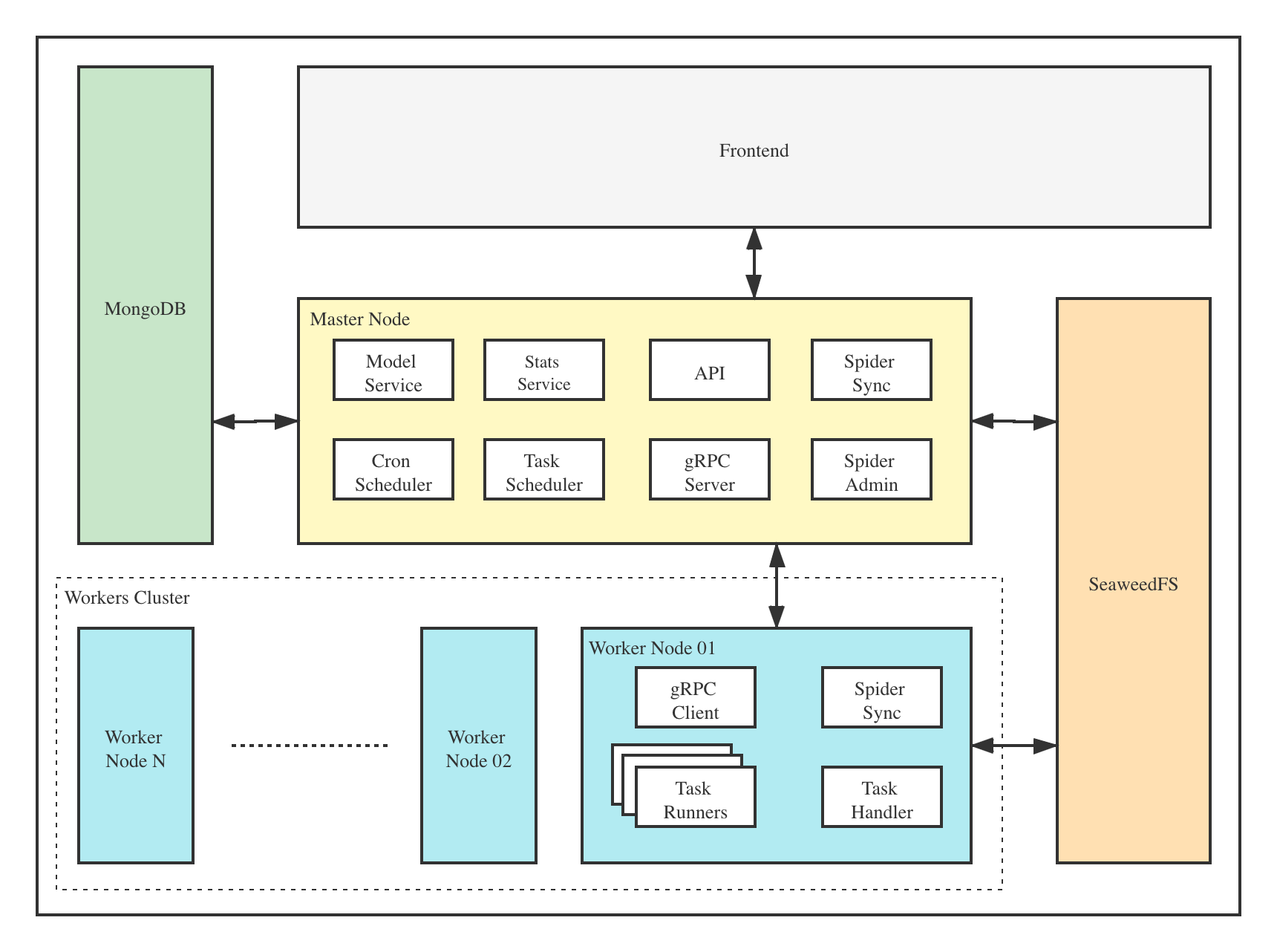
Crawlab的架构包括了一个主节点(Master Node)和多个工作节点(Worker Node),以及 [SeaweedFS](https://github.com/chrislusf/seaweedfs) (分布式文件系统) 和 MongoDB 数据库。
|
||
|
||
|
||
|
||
前端应用与主节点 (Master Node) 进行交互,主节点与其他模块(例如 MongoDB、SeaweedFS、工作节点)进行通信。主节点和工作节点 (Worker Nodes) 通过 [gRPC](https://grpc.io) (一种 RPC 框架) 进行通信。任务通过主节点上的任务调度器 (Task Scheduler) 进行调度分发,并被工作节点上的任务处理模块 (Task Handler) 接收,然后分配到任务执行器 (Task Runners) 中。任务执行器实际上是执行爬虫程序的进程,它可以通过 gRPC (内置于 SDK) 发送数据到其他数据源中,例如 MongoDB。
|
||
|
||
### 主节点
|
||
|
||
主节点是整个Crawlab架构的核心,属于Crawlab的中控系统。
|
||
|
||
主节点主要负责以下功能:
|
||
1. 爬虫任务调度
|
||
2. 工作节点管理和通信
|
||
3. 爬虫部署
|
||
4. 前端以及API服务
|
||
5. 执行任务(可以将主节点当成工作节点)
|
||
|
||
主节点负责与前端应用进行通信,并将爬虫任务派发给工作节点。同时,主节点会同步(部署)爬虫到分布式文件系统 SeaweedFS,用于工作节点的文件同步。
|
||
|
||
### 工作节点
|
||
|
||
工作节点的主要功能是执行爬虫任务和储存抓取数据与日志,并且通过Redis的`PubSub`跟主节点通信。通过增加工作节点数量,Crawlab可以做到横向扩展,不同的爬虫任务可以分配到不同的节点上执行。
|
||
|
||
### MongoDB
|
||
|
||
MongoDB是Crawlab的运行数据库,储存有节点、爬虫、任务、定时任务等数据。任务队列也储存在 MongoDB 里。
|
||
|
||
### SeaweedFS
|
||
|
||
SeaweedFS 是开源分布式文件系统,由 [Chris Lu](https://github.com/chrislusf) 开发和维护。它能在分布式系统中有效稳定的储存和共享文件。在 Crawlab 中,SeaweedFS 主要用作文件同步和日志存储。
|
||
|
||
### 前端
|
||
|
||
Frontend app is built upon [Element-Plus](https://github.com/element-plus/element-plus), a popular [Vue 3](https://github.com/vuejs/vue-next)-based UI framework. It interacts with API hosted on the Master Node, and indirectly controls Worker Nodes.
|
||
|
||
前端应用是基于 [Element-Plus](https://github.com/element-plus/element-plus) 构建的,它是基于 [Vue 3](https://github.com/vuejs/vue-next) 的 UI 框架。前端应用与主节点上的 API 进行交互,并间接控制工作节点。
|
||
|
||
## 与其他框架的集成
|
||
|
||
[Crawlab SDK](https://github.com/crawlab-team/crawlab-sdk) 提供了一些 `helper` 方法来让您的爬虫更好的集成到 Crawlab 中,例如保存结果数据到 Crawlab 中等等。
|
||
|
||
### 集成 Scrapy
|
||
|
||
在 `settings.py` 中找到 `ITEM_PIPELINES`(`dict` 类型的变量),在其中添加如下内容。
|
||
|
||
```python
|
||
ITEM_PIPELINES = {
|
||
'crawlab.scrapy.pipelines.CrawlabPipeline': 888,
|
||
}
|
||
```
|
||
|
||
然后,启动 Scrapy 爬虫,运行完成之后,您就应该能看到抓取结果出现在 **任务详情 -> 数据** 里。
|
||
|
||
### 通用 Python 爬虫
|
||
|
||
将下列代码加入到您爬虫中的结果保存部分。
|
||
|
||
```python
|
||
# 引入保存结果方法
|
||
from crawlab import save_item
|
||
|
||
# 这是一个结果,需要为 dict 类型
|
||
result = {'name': 'crawlab'}
|
||
|
||
# 调用保存结果方法
|
||
save_item(result)
|
||
```
|
||
|
||
然后,启动爬虫,运行完成之后,您就应该能看到抓取结果出现在 **任务详情 -> 数据** 里。
|
||
|
||
### 其他框架和语言
|
||
|
||
爬虫任务实际上是通过 shell 命令执行的。任务 ID (Task ID) 作为环境变量 `CRAWLAB_TASK_ID` 被传入爬虫任务进程中,从而抓取的数据可以跟任务管理。
|
||
|
||
## 与其他框架比较
|
||
|
||
现在已经有一些爬虫管理框架了,因此为啥还要用Crawlab?
|
||
|
||
因为很多现有当平台都依赖于Scrapyd,限制了爬虫的编程语言以及框架,爬虫工程师只能用scrapy和python。当然,scrapy是非常优秀的爬虫框架,但是它不能做一切事情。
|
||
|
||
Crawlab使用起来很方便,也很通用,可以适用于几乎任何主流语言和框架。它还有一个精美的前端界面,让用户可以方便的管理和运行爬虫。
|
||
|
||
|框架 | 技术 | 优点 | 缺点 | Github 统计数据 |
|
||
|:---|:---|:---|-----| :---- |
|
||
| [Crawlab](https://github.com/crawlab-team/crawlab) | Golang + Vue|不局限于 scrapy,可以运行任何语言和框架的爬虫,精美的 UI 界面,天然支持分布式爬虫,支持节点管理、爬虫管理、任务管理、定时任务、结果导出、数据统计、消息通知、可配置爬虫、在线编辑代码等功能|暂时不支持爬虫版本管理|   |
|
||
| [ScrapydWeb](https://github.com/my8100/scrapydweb) | Python Flask + Vue|精美的 UI 界面,内置了 scrapy 日志解析器,有较多任务运行统计图表,支持节点管理、定时任务、邮件提醒、移动界面,算是 scrapy-based 中功能完善的爬虫管理平台|不支持 scrapy 以外的爬虫,Python Flask 为后端,性能上有一定局限性|   |
|
||
| [Gerapy](https://github.com/Gerapy/Gerapy) | Python Django + Vue|Gerapy 是崔庆才大神开发的爬虫管理平台,安装部署非常简单,同样基于 scrapyd,有精美的 UI 界面,支持节点管理、代码编辑、可配置规则等功能|同样不支持 scrapy 以外的爬虫,而且据使用者反馈,1.0 版本有很多 bug,期待 2.0 版本会有一定程度的改进|   |
|
||
| [SpiderKeeper](https://github.com/DormyMo/SpiderKeeper) | Python Flask|基于 scrapyd,开源版 Scrapyhub,非常简洁的 UI 界面,支持定时任务|可能有些过于简洁了,不支持分页,不支持节点管理,不支持 scrapy 以外的爬虫|   |
|
||
|
||
## 贡献者
|
||
<a href="https://github.com/tikazyq">
|
||
<img src="https://avatars3.githubusercontent.com/u/3393101?s=460&v=4" height="80">
|
||
</a>
|
||
<a href="https://github.com/wo10378931">
|
||
<img src="https://avatars2.githubusercontent.com/u/8297691?s=460&v=4" height="80">
|
||
</a>
|
||
<a href="https://github.com/yaziming">
|
||
<img src="https://avatars2.githubusercontent.com/u/54052849?s=460&v=4" height="80">
|
||
</a>
|
||
<a href="https://github.com/hantmac">
|
||
<img src="https://avatars2.githubusercontent.com/u/7600925?s=460&v=4" height="80">
|
||
</a>
|
||
<a href="https://github.com/duanbin0414">
|
||
<img src="https://avatars3.githubusercontent.com/u/50389867?s=460&v=4" height="80">
|
||
</a>
|
||
<a href="https://github.com/zkqiang">
|
||
<img src="https://avatars3.githubusercontent.com/u/32983588?s=460&u=83082ddc0a3020279374b94cce70f1aebb220b3d&v=4" height="80">
|
||
</a>
|
||
|
||
## JetBrains 支持
|
||
|
||
<p align="center">
|
||
<a href="https://www.jetbrains.com" target="_blank">
|
||
<img src="https://resources.jetbrains.com/storage/products/company/brand/logos/jb_beam.png" height="360">
|
||
</a>
|
||
</p>
|
||
|
||
## 社区
|
||
|
||
如果您觉得Crawlab对您的日常开发或公司有帮助,请加作者微信 tikazyq1 并注明"Crawlab",作者会将你拉入群。
|
||
|
||
<p align="center">
|
||
<img src="https://crawlab.oss-cn-hangzhou.aliyuncs.com/gitbook/qrcode.png" height="360">
|
||
</p>
|